
Freecolab for High Scholars
Freecolab Scholars is a dedicated space for students, learners, and aspiring academics in Zimbabwe. Access free educational resources, connect with peers, collaborate on projects, and build your academic network in a supportive, innovative environment.
- Open access to quality educational content
- Peer-to-peer learning and mentorship
- Collaborative study groups and projects
- Access to scholarships and opportunities
Comprehensive Resources
1. Books
You get a variety of academic books wich might include textbooks, greenbooks, novels even self help books from peers and professionals here all through the Library Page.
- All in one place for all subject textbooks you need.
- All in one place for the compilation of exam material you need.
- All in one place for the novels and self help books to aid you hobbies and understanding.
2. Past Exam Papers
Access to past exam materail has never been that open and easy from anywhere and at anytime. We got you covered.
- We have made it so open and easy for everyone with access to some to just upload so that everyone can also access.
- Organised per year, session and with just a search or few clicks you can get the material you want instantly.
- Easy previews of any material in our clean PDF Viewer if you dont wish to download. The pdf viewer also include some tools you can use to make the interaction with the documents easy, right inside the app, without leaving the platform
3. Subject Courses
These are subject specific or even topic specific and you can browse from a variety of professional creators of these courses
- Each course has clearly outlined chapters, that you can mark as complete
- Each chapter include files, text, videos, images, clearly formatted blocks of content made for both small and large screens
- After enrolling into any course, you can track your progress and when the course is updated the changes reflect instantly without altering your progress unless a new chapter is added.
- Each chapter might include an assessment at the end that you can take to reinforce your understanding. At the end of the course there might also be an assessment to confirm that you got the most of out of course
4. Practice Tests
We have made these competition driven, and they are the ones making up the Leaderboard
- Professionals/teachers create these in form of multiple choice or structured questions and upload them.
- New uploads might appear in the home feed as part of the posts
- Or get the ones for your subjects in the Practise Tests Page
- Once you decide to take a test, take it serious because, once you get to the end and submit the results you your score is permanently recorded first time, and that score for that test will remain unchanged if you then retake the test. The score increments your points on the leaderboard, in your network and with all other students of your level .
5. Virtual Lab
Access to the lab instruments to get a view of what you get to learn looking at a 2d diagram, is a privilege to some and we aim to close that gap. Our team continues to create these 3d illustrations of diagrams, you can interact with to get a close look at what they are.
- Right into you mobile phone, pc or any screen get the same experience of zooming in and out view from any angle you want
- You have an opportunity to visualize what will be happening with our live animations that try to imitate the true process.
- If there is some "physics" involved we have also tried to use the true formulas that explain what happens in real time as actions are involved
- We have already made some for your math, eg thee visualizer of solids of revolution, areas bounded by functions of any equation at high school level you can think of.
Peer Collaboration
Collaboration remains our key value
The idea of everyone being able to contribute their efforts in trying to create and learn, remains at the core of what we value the most and we have made that possible by eliminating the separation that exists because of our geographical locations.
- If you are stuck or have an idea about anything, this is the proper place to layout everything you have and others are waiting to jump in and help.
- We also encourage you to contribute as much as you can to maintain this culture and grow the platform to be even more useful to anyone that comes next on the platform to get the value they expect.
- If you have a project you are working on, you can start it here, invite your peers and you can work together from anywhere with anyone of any skill
National Network
The network value
The intended network effect is built upon the social aspect of this platform.
- Get to connect with any teacher from any location or any school
- Get to connect with any school to stay up to date with what transpires everyday, maybe one day you want to be there
- Connect with any student from any schoolin any location and share everything from your similarities to your differences
Academically centered feed algorithms
Your academics remains the top priority
If you set up your account to be a student then the algorithm for you feed is also going to cater the best value made for the student, its going to be different from the professional and school accounts. Across all the services you get here the algorithms for all these services:
- prioritise posts to do with your academic subjects and posts from teachers you follow or interact with the most
- inject practice tests in your feed, that are for your subjects to break the scrolling and engage with what others have been doing productively
- inject video tutorials and articles to have a look at too that go in depth on certain topics of interest.
Achievement and progress tracking
Your academic progress is saved
To keep track of any achievement or progress in any academic persuit. We have made it possible to manage your progress and always make sure you have a summary of what you have been doing for your own self assessment.
- We track progress in courses, and bear in mind that the creator who is a professional/teacher of the course is also able to see thi progress, since they mark your work, and pass comments to improve on.
- We track your progress in practise tests,and bear in mind that the creator who is a professional/teacher of the course is also able to see this progress, since they mark your work, and pass comments to improve on
- Still to come - our ebooks created on this platform that are created here and are meant to stay here on the platform will be tracked too put this stays private to you unless you share it outside intentionally
Career guidance and opportunities
The way forward
After all the academics, you need opportunities to go further
- Most of the posts marked Sponsored are academically focused. Most of the adverts that you get to see are relevant to you and mainly opportunities for you.
- These include scholarship opportunities, admissions in schools, events in schools, sponsored professional updates on sales of their extra services on the platform and outside the platform.
- Professional and school accounts have an opportunities to share their expereiences in their professional journeys to insipire you as a student, as well as posting these opportunities to go for and advance further with your academics and professional journey.
Everything tries to work together together as one to give you the best experience you deserve while you achieve those academic goal, is one socio-academic platform.
Next up is how to use, and how Freecolab works
The Home Page
Who controls your feed?
You are in control of what you see when you visit the platform
- The algorithm works with what tends to interest you to suggest the posts by the everyone on the platform
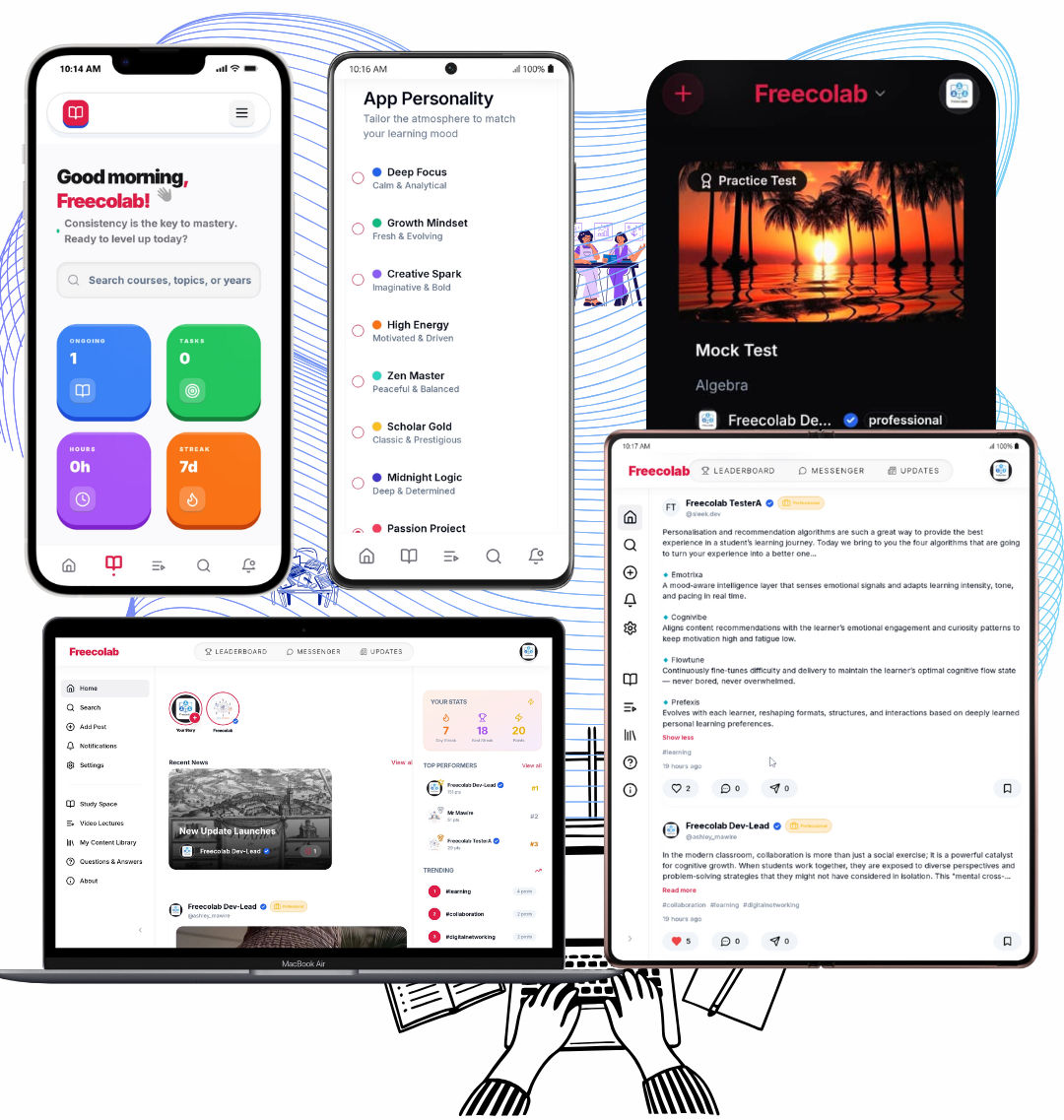
- Signals that control your feed recommendations- in order of greatest impact are your subjects, accounts you follow, posts you like, posts you comment on, likes on comments of posts, your location , the school you are at and last but not least your engagements like mentions in posts, tags of your interest , freads your repost activity
Choose who to follow wisely and interact with posts you find fascinating for the algorithm to understand you better to continue giving you the best feed possible that resonates with you
What is included in the home page feed?
The algorithm is made to prevent doomscrolling without doing anything academic related, in as much as the culture we recommend in our posts must be academic and helping anyone on the platform to achieve their academic and professional goals.
- Suggested courses that your close network has enrolled into, for your subjects and professionals/teachers you follow which come labelled "Suggested courses"
- Suggested video lectures or tutorials which match your subjects, interests and accounts you follow which come labelled "Suggested to watch"
- Suggested blog articles from people you follow which come labelled "Suggested Morning/Afternoon/Evening/Night Digest"
- Suggested practice test created by professionals in your network and outside the network which are recommended from your subjects and come labelled "Suggested for you" with nudges/motivational messages to take them
- Suggested accounts to follow are based on your interactions with any material on the platforms posts and other content on the platform. In addition to that the existing relationships that you already have with your network and their interests"Suggested to follow" with reasons to follow
- Recent/Daily news/updates in education created by verified professionals on the platform and they come labelled "Recent news" and you get the top ones that you havent checked out when they are available
- Popular posts recently in your network, that you might as well check out which come labelled "Popular Today/Yesterday/This week/This Month/All time" available
- The brief of the leaderboard on the practice tests in your network which come labelled "Top 3 in Your network" with their points on the leaderboard
Making use of these suggestions makes you stay up to date with what your network has been up to and move together, and either maintain, raise or lower your position on the leaderboard in your network or all high school students on the platform
You get to choose pages to use
In a variety of services and features we have also made it possible but limited for now for you select pages that you want to show or hide
- Go to Settings under customization
- Or directly to the page using this link Choose pages
Under the Choose pages:
- You can turn on or off certain pages
- Choose which pages to show in the main left sidebar or the header
- Reorder pages to appear in your order of preferences
- Or choose from the premade Templates for you
- However this is still limited, and there are pages that you are required to have by default these are Home,Add Post,Explore,Settings,Your Activity,Notifications,My Content Library
- Most of your activity pages on the platform can be accessed by clicking on the avatar of you profile in the header in the Home page
How to interact with posts in your feed
Each post that appears on your feed tells a story about you and your network ie is for you, and each post card has quite a lot of information it carries.
- If someone or some people in your network/followers/following have reposted the post , you are going to see this info on the top of the post eg "Gary J, John M reposted this view reposts", with their profile avatars stacked on top of each other. Onclick of the "View Reposts" you will be able to get to view all the reposts made on that post in full detail
- Below repost you get the brief info of the post owner ie their avatar, display name, username, number of followers, their account type badge, whether they are verified or not and a button to follow the account, which will show "Following" if you are already following the account, then aa button to download the post as a note if you really like it
- Then there is the post content below with the title of the post and the rest of the post content. An @freecolabofficial highlights that the account was mentioned in the post and any user can go to ther profile directly from the post content
- A Read More appears if the post content is long, and it will show twice if the content is too long to then read the full post independently because you are genuinely intrested to know more. This is what makes up freads meaning full reads. A post with a high count of these might be interesting to check out. However bear in mind that it might just be bacause the post content is too long and still others want to know more
- If a post contains media ie images and video, you get to see them. For a post with images you can double tap to like, arrows on the left and right will help you view more images if available. If a post includes a video, the video player allows you to seek the part you want . You can minimize the player to have a small mini popup player that stays with you while you keep scrolling without interupting the video, you can navigate between pages while you have the player playing the video with you.
Actions on the post
- Like - indicates that you found the post interesting, and each post has unique likes of all the users who have found it interesting like you. They are displayed with thier formatted number for readability eg 300 Likes - 6,7k Likes if in thousands, M for millions and B for billions
- Comment - this allows you to get other peoples thoughts on the post, which are meant to be respectful. They are threaded for readability and flow of converations with clear indications of who replied to who, each comment can be liked to. You can edit your comment or delete it permanently and others replies that follow that comment vanish too .They also have numbers formatted for readability eg 9.8k comments, 90 comments etc
- Repost - allows you add your thoughts or additions to the post to have a separate conversation referencing the original post ie they create another independent post that doesn't appear in the main feed but in separate reposts page of a specific post. They also have numbers formatted for readability eg 3.9k reposts, 6.8M reposts etc
- Share - allows you to export the post outside meaning Whatsapp, X, Facebook, LinkedIn or just copy the link, or inside your chats on the platform. They also have numbers formatted for readability eg 90.9k shares, 5.7M shares etc.
- Bookmark - allows you to save the posts in your bookmarks library, to then access them later
- Report - allows you to indicate that you found the post in appropriate. You will be redirected to the Report page to provide more details and submit them to us for review and consider taking action on the post or the owner of the post.
Additional info that comes with the post
- Impressions Count - these are made up of quite a number of metrics on the state of engagement of the post and the information around it. To give you an idea, one of these is the number of times the post was recommended to someone and it appeared in their feed. They also have numbers formatted for readability eg 203k Impressions, 600K Impressions etc.
- Below the post you will notice "Freecolab ZW + 20 others like this" or "Jane J, Godfrey commented on this" if people in your network have liked or commented on the post
- Hashtags - these are very crucial for reach and mapping your relationships with future post recommendations. Each hastag on the post can be clicked to view all posts on that hashtag. eg #motivation will show all posts that tagged motivation
Summary of Home Page
Take note of the following:
- You are responsible for your own feed recommendations
- Follow our guidelines and standards when interacting with posts in your home feed
- Your feed changes with you. The algorithm allows discovery and quick adaptation to you preferences on the platform.
Video Tutorials / Lectures
Under development, come back later
Collaborative &
Open
Success Stories
Hear from scholars who transformed their academic journey with Freecolab
Ready to Start Your Academic Journey?
Join other Zimbabwean scholars who are ready to transform their education with Freecolab. It's free, it's collaborative, and it's designed for you.